
The hardest part of a SAS-to-lakehouse migration is not writing the new code — it is proving that the new code produces the same results as the old code. Stakeholders who have relied on SAS outputs for years, sometimes decades, need ironclad evidence that the migrated workloads are trustworthy before they will sign off on decommissioning the legacy platform.
A parallel-run framework provides that evidence. It runs both the legacy SAS process and the new Snowflake or Databricks process against the same input data, compares outputs systematically, and produces validation reports that satisfy technical reviewers, business owners, and auditors. This article describes how to build and operate such a framework at enterprise scale.
The Parallel-Run Workflow
At its core, the parallel-run workflow consists of five stages that execute in sequence for every migrated workload. Understanding this workflow is essential before diving into the implementation details.
Stage 1: Data Synchronization. Ensure both platforms operate on identical input data. This typically means exporting from the SAS data sources and loading into the lakehouse, or pointing both platforms at a shared data lake. Timing matters — both runs must use the same snapshot.
Stage 2: Dual Execution. Run the SAS program on the legacy server and the converted program on Snowflake/Databricks. Capture execution time, resource consumption, and any warnings or errors from both platforms.
Stage 3: Output Extraction. Extract outputs from both platforms into a common format (typically Parquet or CSV) in a shared comparison staging area. Normalize column names, data types, and sort order to eliminate superficial differences.
Stage 4: Automated Comparison. Apply column-level comparison logic with appropriate tolerance thresholds. Generate a structured diff report documenting matches, mismatches, and edge cases.
Stage 5: Review and Sign-Off. Present the comparison report to the business owner and technical reviewer. Document the decision: approve for production, approve with noted exceptions, or return for rework.
Workflow Summary
Data Sync → Dual Execution → Output Extraction → Automated Comparison → Review & Sign-Off
Each stage is automated except the final review, which requires human judgment. The framework should run unattended for Stages 1–4 and produce a self-contained report for Stage 5.

MigryX migration methodology — Discover, Convert, Validate, Deploy
Output Comparison Methodology
Naive comparison (are the two files byte-identical?) almost never works. SAS and modern platforms represent data differently at the binary level, handle floating-point arithmetic differently, and may order rows differently when no explicit sort is specified. A robust comparison methodology accounts for these differences without masking real discrepancies.
Column-Level Type Matching
Before comparing values, align the schema. SAS has only two data types (numeric and character), while Snowflake and PySpark have rich type systems. Map the schemas to a common representation:
- SAS numeric maps to
FLOAT64for general numerics,INT64for values that are always whole numbers, orDATE/DATETIMEfor SAS date values (stored as numeric days or seconds since epoch). - SAS character maps to
STRING, but watch for trailing spaces. SAS pads character fields to their declared length; most modern platforms trim them.
Row Alignment
Outputs must be compared row-by-row, which requires matching rows between the two datasets. If the output has a natural key (e.g., customer_id, transaction_id), join on that key. If there is no natural key, sort both datasets on the same columns and compare positionally. Document the alignment strategy for each workload — positional alignment is fragile and should be avoided when possible.
Tolerance Thresholds
Not all differences are defects. Floating-point arithmetic produces platform-dependent results at the level of machine precision. Define explicit tolerances per data type — numeric, currency, date, and string fields each require different comparison strategies.
MigryX Validation: Zero-Risk Migration
The number one fear in any migration is silent data discrepancies — numbers that look right but are subtly wrong. MigryX eliminates this risk with automated parallel validation. It runs both legacy and converted code against the same input data, then compares outputs row-by-row and column-by-column. Discrepancies are flagged with root cause analysis pointing to the exact transformation that diverged.
Automated Diff Reports
The comparison engine should produce a structured report for each workload comparison. A well-designed report contains five sections:
1. Executive Summary
A single-line pass/fail verdict with high-level statistics: total rows compared, rows matched, rows with differences, and columns with differences. This is what the business owner reads first.
2. Column-Level Statistics
MigryX generates detailed column-level comparison reports highlighting every discrepancy.
3. Mismatch Detail
For every mismatched row, show the key columns, the SAS value, the target value, and the difference. Limit this section to the first 100 mismatches to keep the report manageable, with a note indicating if more exist.
4. Row Count Reconciliation
Report the row count from each platform. If counts differ, list the keys present in one dataset but not the other. Row count mismatches almost always indicate a logic difference (e.g., different handling of NULL values in a WHERE clause) and must be investigated.
5. Metadata
Record execution timestamps, platform versions, input data snapshot identifier, and the comparison configuration (tolerance thresholds used). This metadata ensures the report is reproducible and auditable.
Edge Cases That Cause False Failures
Even well-designed comparison frameworks produce false mismatches if common edge cases are not handled. These are the most frequent offenders:
NULLs
SAS and SQL platforms represent missing values differently. These are semantically equivalent but will not match in a naive comparison.
Floating-Point Differences
SAS and modern platforms may compute the same logical value but arrive at representations that differ at machine precision. This is inherent to floating-point arithmetic, not a bug.
Date Offsets
SAS uses a different date epoch than Unix-based systems. Date values stored as raw integers require offset correction during comparison.
Character Padding
SAS character variables have fixed lengths and are right-padded with spaces, while modern platforms store strings without padding.
Each edge case category requires specific handling strategies — the SAS date epoch difference alone causes systematic errors if not addressed. MigryX handles all of these automatically.
Pro Tip: Canonicalization Layer
Build a canonicalization step that normalizes both datasets before comparison: trim strings, cast dates to ISO format, round floats to a defined precision, and replace platform-specific NULLs with a sentinel value. This eliminates 80% of false mismatches without hiding real issues.
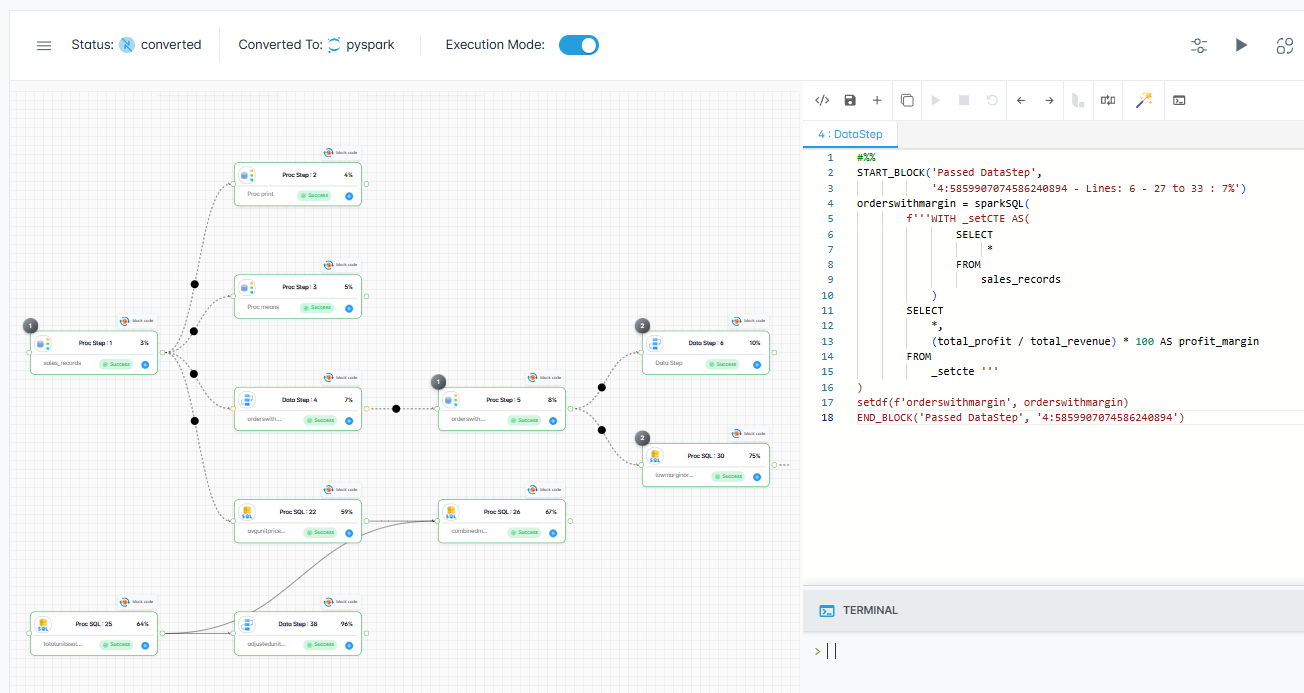
MigryX visual execution tracking confirms every transformation produces identical results
Continuous Validation Throughout the Migration with MigryX
MigryX does not treat validation as a one-time gate at the end of migration. Its validation framework runs continuously throughout the conversion process — catching issues at the individual program level before they compound across dependent pipelines. Teams using MigryX report finding and fixing data discrepancies 10x faster than manual testing approaches.
Validation Metrics Dashboard
For migrations involving dozens or hundreds of workloads, individual reports are not enough. Build a dashboard that tracks validation metrics across the entire migration program.
| Metric | Definition | Target |
|---|---|---|
| Workload Pass Rate | % of workloads passing parallel run with zero critical mismatches | > 95% |
| Column Match Rate | Average % of columns matching exactly across all workloads | > 99.5% |
| Row Count Accuracy | % of workloads where row counts match exactly | 100% |
| Numeric Precision | Max absolute diff for any numeric column across all workloads | < 0.01 |
| Cycle Time | Average days from conversion complete to parallel-run sign-off | < 5 business days |
| Rework Rate | % of workloads requiring code changes after first parallel run | < 20% |
Phased Cutover Strategy
Parallel runs are a means to an end. The goal is to build enough confidence to cut over to the new platform and decommission SAS. A phased cutover minimizes risk by gradually shifting the source of truth.
Phase A: Shadow Mode
Both platforms run. SAS is the source of truth. The modern platform runs in shadow mode, and its output is compared against SAS but not consumed by downstream systems. Duration: 2–4 cycles per workload.
Phase B: Dual Read
Both platforms run. The modern platform becomes the primary source of truth, but SAS continues to run as a safety net. Downstream consumers read from the new platform. Any discrepancy triggers an alert and automatic fallback to SAS output. Duration: 2–4 cycles.
Phase C: Modern Primary
Only the modern platform runs in production. SAS is available on standby but does not execute on schedule. The team retains the ability to re-enable SAS for one release cycle as an emergency fallback. Duration: 1–2 cycles.
Phase D: Decommission
SAS workload is fully retired. The SAS program is archived (not deleted) for audit trail purposes. The SAS license seat is released. This is the moment the license cost savings are realized.
The phased cutover converts migration risk from a cliff (big-bang switch) into a gradient (incremental confidence building). Each phase has a clear exit criterion, and rollback is always possible until Phase D.
Implementing with MigryX
MigryX's platform includes built-in parallel-run support. When you convert a SAS program, MigryX automatically generates comparison logic alongside the target code. The comparison configuration — key columns, tolerance thresholds, and canonicalization rules — is derived from the SAS metadata and can be customized per workload.
After each dual execution, MigryX produces a standardized validation report in the format described above. For enterprise migrations, these individual reports feed into a program-level dashboard that tracks progress across all waves and workloads. Migration managers can see at a glance which workloads are validated, which are in review, and which need rework.
This integrated approach eliminates the need to build comparison infrastructure from scratch — a task that typically consumes 2–4 weeks of engineering time per project and introduces its own bugs if done ad hoc.
Building Trust Through Rigor
Parallel-run validation is not just a technical exercise. It is a trust-building exercise. Every clean comparison report deposits credibility with your stakeholders. Every documented edge case and its resolution demonstrates thoroughness. By the time you reach Phase D and decommission SAS, the question is not "Can we trust the new platform?" but "Why are we still paying for the old one?"
The framework described here scales from a single-workload pilot to a thousand-workload enterprise migration. The principles are the same at any scale: synchronize inputs, execute in parallel, compare rigorously, document everything, and cut over gradually. The only variable is the degree of automation you invest in — and for large migrations, full automation pays for itself many times over.
Why MigryX Validation Changes Everything
The challenges described throughout this article are exactly what MigryX was built to solve. Here is how MigryX transforms this process:
- Automated parallel testing: MigryX runs legacy and modern code side-by-side, comparing every output automatically.
- Root cause analysis: When discrepancies are found, MigryX pinpoints the exact transformation responsible.
- Continuous validation: Issues are caught per-program during conversion, not discovered in UAT months later.
- Stakeholder confidence: Auditable validation reports prove output parity to business owners and regulators.
MigryX combines precision AST parsing with Merlin AI to deliver 99% accurate, production-ready migration — turning what used to be a multi-year manual effort into a streamlined, validated process. See it in action.
Ready to modernize your legacy code?
See how MigryX automates migration with precision, speed, and trust.
Schedule a Demo